
7 min read
Four months. Zero calls.
That was the reality for a draftsman in South Africa who had been spending money on Google Ads every single day and getting nothing back. The skills were there. The service was solid. But local customers simply could not find him online.
Then he stopped paying for clicks and built something better.
By using programmatic SEO for WordPress, he created 50 hyper targeted location pages in a fraction of the time it would have taken to write them one by one. Google indexed about 10 of those pages in the first few weeks. Within three weeks, he had 3 signed clients and 4 warm leads.
No ad spend. No agency. Just a repeatable system that worked.
This guide shows you how to build that same kind of system yourself, from keyword research to automation, and from technical SEO to indexing strategy, using tools you can set up without hiring a developer.
Imagine pouring your hard-earned budget into Google Ads day after day, only to hear crickets, no calls, no leads, no growth.
That was the frustrating reality a South African draftsman faced for four long months, despite offering top-tier services that locals desperately needed. His online presence? Buried in search results, invisible to potential clients.
But then, everything changed.
He ditched the endless ad spend and harnessed the power of programmatic SEO for WordPress, effortlessly generating 50 laser-focused location pages in a matter of hours.
Google indexed a handful within weeks, and by week three, he landed 3 new clients and 4 promising leads, all organic, zero agencies involved.
In a world where AI-driven search and hyper-local intent dominate 2026’s SEO landscape, programmatic SEO isn’t just a tactic; it’s your scalable secret weapon for dominating local markets.
This comprehensive guide equips you with a step-by-step playbook, from smart keyword validation to AI-enhanced automation, robust technical setups, and proven indexing strategies, using affordable, no-code tools to build hundreds of ranking pages that convert.
Whether you’re a solo entrepreneur or scaling a service business, get ready to transform your WordPress site into a lead-generating machine.
| Service | City | Slug | Avg. Pricing |
|---|---|---|---|
| Drafting | Cape Town | drafting-cape-town | R5,000 to R15,000 |
| Drafting | Sandton | drafting-sandton | R8,000 to R20,000 |
| Drafting | Pretoria | drafting-pretoria | R6,000 to R16,000 |
| Drafting | Johannesburg | drafting-johannesburg | R7,000 to R18,000 |
example.com/drafting/gauteng/sandton/
This structure creates clearer crawl paths and stronger topical organisation. It is a better long term option if you plan to expand into multiple services and regions.
Flat, easier for smaller sites:
example.com/drafting-sandton/
This is simpler to manage when you are starting out. Pick one structure and stick with it. Changing URLs after publishing can break internal links and interrupt indexing.
[Local Project Image] variable here, along with a short description of the work completed in that area. Even a small amount of real local proof can make the page far more believable.
4. Pricing Expectations, about 50 words
Use your [Avg. Pricing] variable. People searching for a service in a specific city often want a rough idea of price before they make contact.
5. Local FAQ, about 150 words
Add two or three questions that are specific to that location. For example, “Do I need special approval for extensions in Cape Town heritage zones?” This kind of content helps you target long tail queries and adds topical depth.
6. Internal Links
Include 2 to 3 contextual links pointing to your main Service Hub page and nearby city pages. These links help both users and Google crawlers move through your site.
7. Interactive Map and Contact Form
Insert your [Map Embed Code] variable here. A visible, location-specific map strengthens local relevance.
| Role | Tool |
|---|---|
| Hosting | Hostinger, or a similar self hosted WordPress environment |
| CMS | WordPress |
| Custom Data Fields | JetEngine, using Custom Post Types |
| Page Design | Elementor Pro |
| SEO Meta Management | SEOPress, via REST API |
| Automation | n8n |
| API Testing | Postman |
Spreadsheet / Database
       ↓
   n8n Workflow
  (JSON formatting)
       ↓
WordPress REST API
       ↓
Published Location Page
n8n Node 1: Create page via WordPress REST API
↓
n8n Node 2: Write metadata via SEOPress REST API
↓
Page is live with SEO fields already populatedPOST /wp-json/seopress/v1/posts/{id}{
"seopress_titles_title": "Drafting in Cape Town | YourCompany",
"seopress_titles_desc": "Looking for architectural drafting in Cape Town? We handle residential and commercial plans. Get a quote today.",
"seopress_robots_canonical": "https://yoursite.com/drafting-cape-town/"
}[Service] and [Location] variables into n8n dynamically, so every page is published with a unique, keyword-targeted set of metadata without ever touching the dashboard.
Title tag pattern: [Service] in [Location] | [Company Name]
Meta description pattern: Looking for [Service] in [Location]? [Brief value proposition]. Contact us for a quote.
This is one of the highest leverage parts of the entire system. Thin or duplicate meta tags can quietly hurt indexing. Automating them through the SEOPress API helps make each page look like a distinct, well-optimised entry point from the moment Google crawls it.
nameimageaddresspriceRangeareaServedProgrammatic SEO transforms WordPress sites from static to scalable powerhouses, driving organic traffic and leads without endless ad spend.
By following this guide, validating keywords, structuring data, building templates, automating processes, optimizing technically, and scaling wisely, you’ll create ranking pages that deliver real results.
Start small with 50 pages, monitor performance in Google Search Console, and iterate. The tools are user-friendly, and the system is repeatable. Elevate your online presence today—unlock growth with pSEO. For expert help, schedule a consultation.
What some of our customers had to say:
EXCELLENT Based on 38 reviews
 Posted on Google
 Denis Cojocaru13/02/2026Cea mai bună agenție SEO din București, Sector 6. Staful știe ce face, am avut rezultate foarte bune cu ei!Posted on Google
 Georg Wittb25/01/2026A friend recommended me this seo agency in Bucharest. After working with them I can say, they are very professional & they really understand how it improve your digital presence.Posted on Google
 Carmine D'Onofrio25/01/2026I was pleasantly surprized to find the best SEO agency în Romania, right here în Sector 6 of all places. I highly recommend them.Posted on Google
 Mircea Popescu23/01/2026Locuiesc in București, sector 6 și am fost surprins să aflu că există o agenție SEO fix lângă casă.Posted on Google
 dan albu10/01/2026Cea mai buna agentie SEO cu care am colaborat! Recomand cu incredere!!Posted on Google
 Mike Meyerson01/11/2025It's refreshing to work with an agency that truly understands the latest SEO guidelines and how to implement them effectively with WordPress sites. Their passion for helping clients succeed is evident. We saw impressive results much faster than we had expected. After some mediocre attempts with other providers, we're glad to have found them. Highly recommended!Posted on Google
 Enea Ionut21/10/2025Mii de multumiri Christiaan!!! Recomand cu incredere Website Squadron! Am colaborat pentru a ne imbunatati vizibilitatea online, iar rezultatele sunt clare. Strategia lor integrata de SEO, implementarea eficienta a campaniilor de Google Ads si optimizrea platformei WordPress au dus la o crestere vizibila a pozitiei noastre in clasamentul Google. Comunicarea fost excelenta, iar expertiza lor in domeniu este de necontestat. Un partener de incredere pentru crestere organica si platita.Posted on Google
 Fiona Kertalli09/10/2025We found the best seo agency in Bucharest. It is a pleasure to work with these guys.Posted on Google
 Buck south Landscaping30/09/2025"We get incredible results from this seo agency, sitiated in Romania of all places."Posted on Google
 Agustin Sanchez30/09/2025⭐️⭐️⭐️⭐️⭐️ “Website Squadron did an outstanding job building my website! They were professional, responsive, and really took the time to understand my business. The design looks clean, modern, and easy to use. I’ve already noticed more customers finding me online thanks to their work. Highly recommend Website Squadron for anyone looking to grow their business with a strong online presence!”
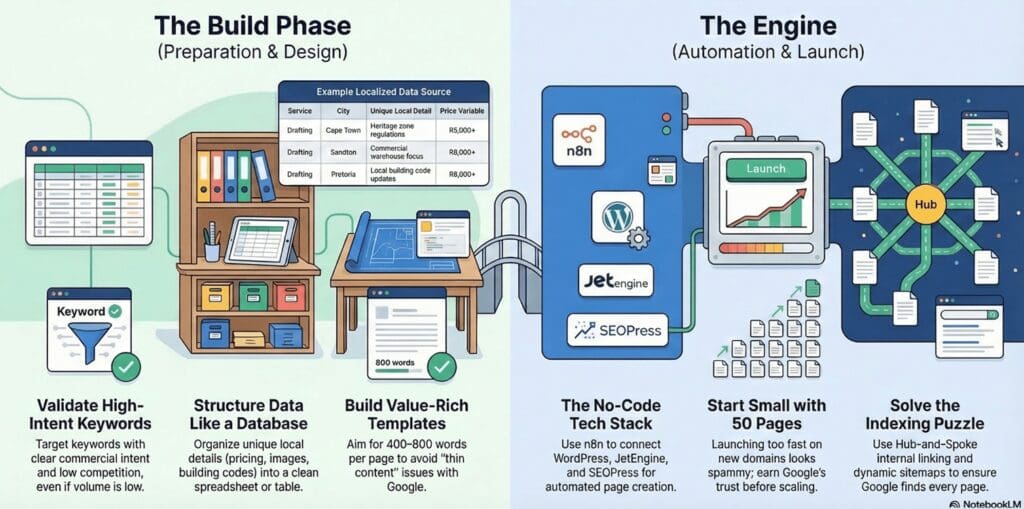
Programmatic SEO (pSEO) for WordPress involves automating the creation of large numbers of optimized pages using structured data sources like spreadsheets and master templates.
It integrates tools such as JetEngine, Elementor Pro, and the WordPress REST API to generate dynamic, unique pages targeting combinations like {Service} + {Location} (e.g., “Architectural Draughtsman in Cape Town”), helping businesses scale SEO efforts without manual page creation.
It enables scalable organic traffic growth without relying on ads or agencies, targets high-intent bottom-of-funnel keywords, and can lead to quick results like indexing within weeks and generating leads.
For example, a user created 50 location pages and secured 3 clients plus 4 leads in three weeks. It also helps dominate local markets in an AI-driven SEO environment by compounding traffic over time.
To prevent issues like thin content or spammy appearances, ensure each page has 400-800 words with genuine localization (e.g., local codes, projects, and FAQs), start small with 50 pages on new domains to build Google’s trust, and incorporate strong internal linking from hub pages to avoid orphaned content that Google might ignore.
Monitor progress in Google Search Console before scaling.
This post was written by u/WebsiteCatalyst on 10 March 2026.
If you have any questions, try our FAQ.
 I need an SEO wingman