
3 min read
Defender Pro is a fantastic tool to protect your WordPress website against Internet enemies seeking to compromise it.
See why we think so, what it does, and how you enable certain features.
It is you WordPress Iron Dome.
Defender Pro is an advanced WordPress security plugin designed to protect websites from common threats, including malware, unauthorized access, brute-force attacks, and data leaks.
It combines multiple layers of defense into a single, user-friendly system, making it ideal for both beginners and professionals.
With features such as firewall protection, real-time malware scanning, two-factor authentication, activity logging, and actionable security recommendations, Defender Pro ensures that your website remains secure and resilient against evolving online threats.
More than just a plugin, it provides peace of mind by simplifying security management and reducing the chances of downtime, data theft, and reputational damage.
Your first line of defense, like a radar shield that detects and blocks enemy aircraft before they reach base.
Enable the firewall in Defender Pro.
Block suspicious IPs after repeated failed login attempts.
Use the IP banning option to blacklist or whitelist addresses.
Review 404 logs to spot malicious file requests and block those IPs.
Think of it as reconnaissance drones patrolling your airspace, scanning for hidden threats and reporting anything suspicious.
Turn on scans for WordPress core, themes, and plugins.
Enable suspicious code detection for deeper checks.
Schedule weekly scans during low-traffic times.
Review scan results, update or replace compromised plugins, and delete old error logs.
The secure gate to the airplane hangar, guarded by ID checks, two-factor clearance codes, and secret entry points.
Enable two-factor authentication (2FA) for all admins.
Hide or mask the default “wp-admin” login page with a custom URL.
Monitor login attempts and block repeated failures automatically.
Activate pwned password protection to prevent weak or breached passwords.
Your mission briefing: A checklist of pre-flight safety measures to keep your craft airworthy and combat-ready.
Follow the 12 Defender Pro recommendations until all show green ticks:
Disable file editor
Prevent information disclosure
Update WordPress and PHP
Change default “admin” user
Rotate security keys every 60 days
Disable XML RPC
Hide error reporting
Prevent PHP execution
Manage login duration
Disable trackbacks and pingbacks
Prevent user enumeration
Apply each with the one-click option inside Defender.
We take data privacy very seriously.
The black box recorder of your website, tracking every move and revealing who’s been in the cockpit.
Turn on audit logging to track all admin and user actions.
Filter logs by user to see exactly who changed what.
Use logs to spot unauthorized changes, then reset passwords if needed.
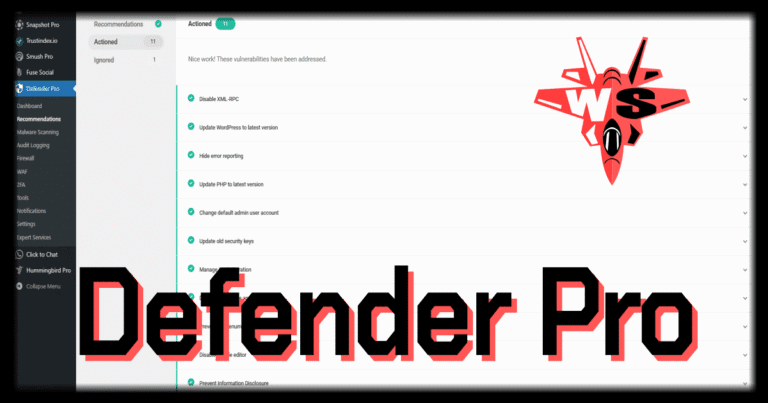
Apply these 12 points below, and you’ll have a fully hardened WordPress environment with Defender Pro’s green shield of approval.
Go to Defender Pro > Recommendations.
Find Disable File Editor and click the action button.
This removes the option for anyone with access to edit theme or plugin files directly from WordPress.
In Recommendations, select Prevent Information Disclosure.
Defender will automatically update your .htaccess (or equivalent) to hide version numbers and sensitive details.
This makes it harder for bots to detect known vulnerabilities.
From Recommendations, click the update prompt.
WordPress will auto-update to the latest stable release.
For PHP, it will show if your hosting version is outdated, and you may need to request an upgrade from your host.
If your username is still “admin”, Defender will flag it.
Follow the prompt to create a new administrator account with a unique name.
Delete or demote the old “admin” account to remove the risk.
Click the Rotate Keys option in Recommendations.
Defender will generate new authentication keys and salts in wp-config.php.
You’ll be logged out and need to log back in — a normal part of the process.
Use the one-click action in Recommendations.
This blocks XML RPC requests, which are often exploited for brute-force or DDoS attacks.
If you rely on services like Jetpack, check compatibility before disabling.
Enable the Hide Error Reporting option.
This prevents PHP errors from displaying on the front end of your site.
Hackers can no longer use those error messages to find weak spots.
In Recommendations, select Prevent PHP Execution.
Defender will add rules to block PHP files from running in sensitive directories (like uploads).
This stops attackers from planting malicious scripts in those folders.
Click Manage Login Duration and set a time limit (for example, auto-logout after 30 minutes of inactivity).
This ensures that even if someone forgets to log out, the session won’t stay open indefinitely.
Turn this option off through Recommendations.
This prevents spammers and bots from abusing WordPress’s trackback/pingback system.
Enable Prevent User Enumeration with the one-click toggle.
This blocks attempts to harvest usernames by adding queries like ?author=1 to your site’s URL.
Defender Pro’s Recommendations dashboard will show a list of items with a status (green check = done, red or orange = pending).
Click the Fix button beside each until all turn green.
Review them regularly, since new recommendations may appear as your site evolves.
Your early warning sirens, sending alerts when enemy activity is detected so you can scramble the jets.
Enable real-time alerts for malware scans, firewall lockouts, and new recommendations.
Choose frequency (daily or weekly summaries).
Assign email recipients for alerts so you never miss security issues.
Like maintaining reserve aircraft on standby, ready to roll out if the front-line squadron gets damaged.
Keep at least 28 days of backups with a plugin like Updraft Plus.
If compromised, roll back to a clean version and patch vulnerabilities.
Store backups off-site (Dropbox, Google Drive, etc) for safety.
Special operations gear, from stealth logins to global bans; these are the advanced tactics for achieving ultimate air superiority.
Force password reset: Trigger all users to reset passwords if needed.
Global IP blocking: Apply the same IP blacklist across all your sites.
User agent banning: Restrict or block bad bots that slow your server.
Google reCAPTCHA or Cloudflare Turnstile: Add extra login/registration security (Turnstile recommended for performance).
Defender Pro provides a comprehensive, reliable, and practical solution for securing WordPress websites.
By enabling its core features, following the built-in recommendations, and monitoring threats through its intuitive dashboard, users can quickly harden their sites without needing technical expertise.
Combined with regular backups and proactive alerts, Defender Pro helps create a secure environment that allows website owners to focus on growth instead of constantly worrying about security risks.
It transforms WordPress security from a complex task into a streamlined process, giving you confidence that your website is well-protected at all times.
What some of our customers had to say:
EXCELLENT Based on 38 reviews
 Posted on Google
 Denis Cojocaru13/02/2026Cea mai bună agenție SEO din București, Sector 6. Staful știe ce face, am avut rezultate foarte bune cu ei!Posted on Google
 Georg Wittb25/01/2026A friend recommended me this seo agency in Bucharest. After working with them I can say, they are very professional & they really understand how it improve your digital presence.Posted on Google
 Carmine D'Onofrio25/01/2026I was pleasantly surprized to find the best SEO agency în Romania, right here în Sector 6 of all places. I highly recommend them.Posted on Google
 Mircea Popescu23/01/2026Locuiesc in București, sector 6 și am fost surprins să aflu că există o agenție SEO fix lângă casă.Posted on Google
 dan albu10/01/2026Cea mai buna agentie SEO cu care am colaborat! Recomand cu incredere!!Posted on Google
 Mike Meyerson01/11/2025It's refreshing to work with an agency that truly understands the latest SEO guidelines and how to implement them effectively with WordPress sites. Their passion for helping clients succeed is evident. We saw impressive results much faster than we had expected. After some mediocre attempts with other providers, we're glad to have found them. Highly recommended!Posted on Google
 Enea Ionut21/10/2025Mii de multumiri Christiaan!!! Recomand cu incredere Website Squadron! Am colaborat pentru a ne imbunatati vizibilitatea online, iar rezultatele sunt clare. Strategia lor integrata de SEO, implementarea eficienta a campaniilor de Google Ads si optimizrea platformei WordPress au dus la o crestere vizibila a pozitiei noastre in clasamentul Google. Comunicarea fost excelenta, iar expertiza lor in domeniu este de necontestat. Un partener de incredere pentru crestere organica si platita.Posted on Google
 Fiona Kertalli09/10/2025We found the best seo agency in Bucharest. It is a pleasure to work with these guys.Posted on Google
 Buck south Landscaping30/09/2025"We get incredible results from this seo agency, sitiated in Romania of all places."Posted on Google
 Agustin Sanchez30/09/2025⭐️⭐️⭐️⭐️⭐️ “Website Squadron did an outstanding job building my website! They were professional, responsive, and really took the time to understand my business. The design looks clean, modern, and easy to use. I’ve already noticed more customers finding me online thanks to their work. Highly recommend Website Squadron for anyone looking to grow their business with a strong online presence!”
Yes you can.
No.
You can look at other plugins, such as WordFence and Really Simple Security, but each comes with its own price tag and setup complexities.
This page was last updated on 13 September 2025 by Christiaan Gouws.
If you have any questions, try our FAQ.
 I need an SEO wingman